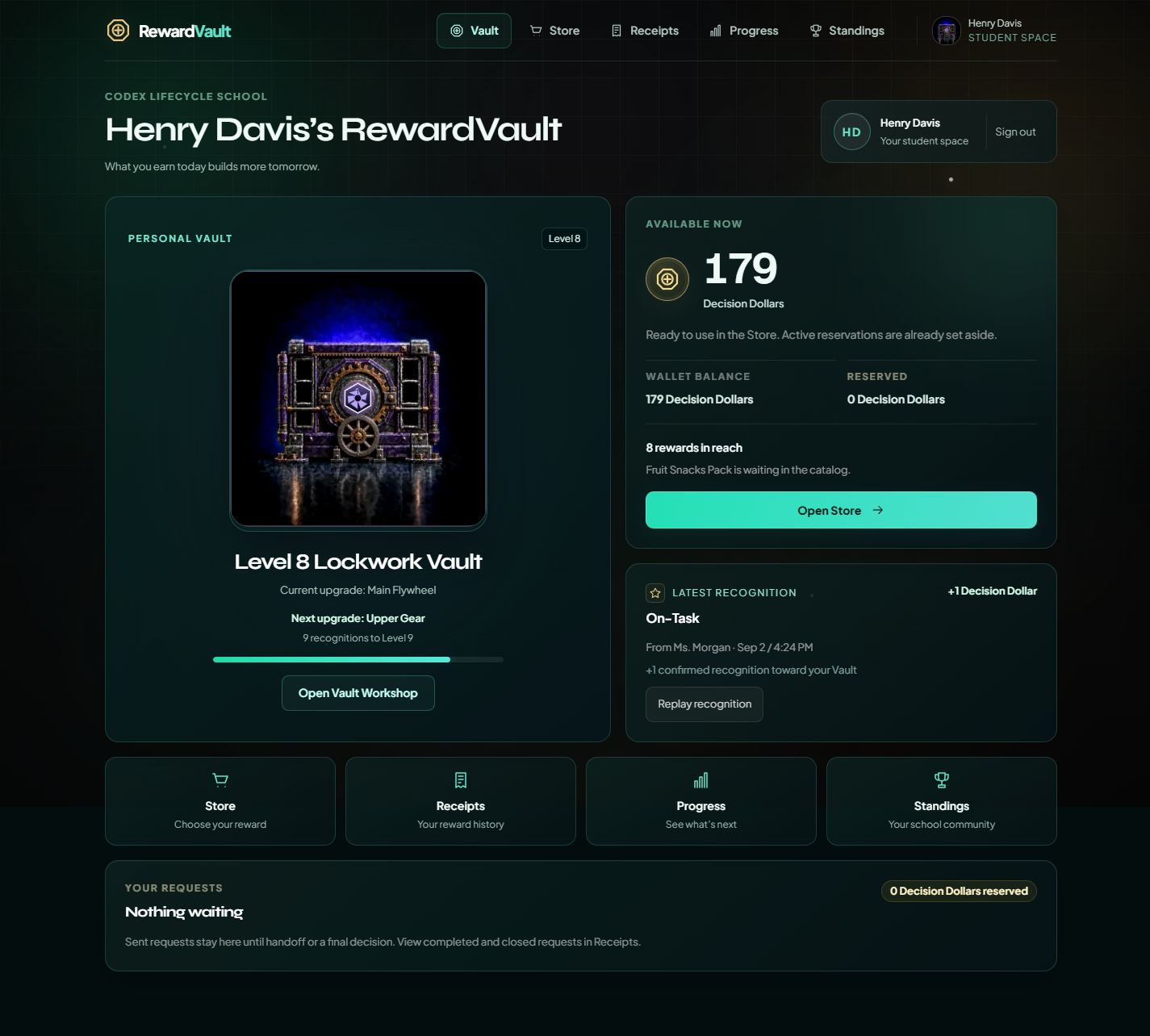
School-configured from day one

Replace paper reward tickets with student wallets, classroom goals, and a store queue staff can run.

Keep your currency names, approved reasons, and store items. RewardVault moves the daily reward program out of paper tickets and manual tracking.

Flat annual school pricing starts at $600/year.
Platform Preview
Product preview, sample school data
Sample reward loop
Award, wallet, queue, review
Sample school data
Teacher award board
Select students and reason
MR
Marcus Rivera
Room 101 - On-Task + Respect
HC
Harper Collins
Room 101 - On-Task + Respect
Send 10 Decision Dollars
Student wallet
87 DD
Balance, receipt, and reward target
Store queue
Homework Pass
Pending approval - 50 DD held
Review
Standings are configurable: school-wide, classroom-focused, or disabled entirely.
Schools control the currency names, recognition reasons, classroom goals, store items, standings preference, and data review path. The public preview uses sample data so buyers can inspect the workflow before scheduling a call.
Why Schools Buy
A reward system has to work after week one.
RewardVault is built around the daily jobs schools already have: recording positive recognition, showing student wallet balances and receipts, approving store requests, and checking award activity, student reach, and fulfillment.
Staff adoption
Student wallet
Program visibility
Your names and rules
Step 01
Teacher awards
Staff select students and school-approved reasons from the award board.
Step 02
Student wallet updates
Students see their receipt, balance change, and reward target.
Step 03
Store queue moves
Store staff approve, mark ready, fulfill, or refund requests.
Step 04
Admin reviews
Leaders review roster status, awards, store requests, and activity.
See The Product
The daily workflow, shown plainly
Teachers choose students and school-approved reasons. Students see the receipt. Classroom goals stay separate. Administrators can review activity without asking for another spreadsheet.
Open the guided preview
Teacher flow
Teacher award board
Teachers select students, choose a school-approved reason, and send the award from one board.
Teacher send board
3 students selected - Decision Dollars - On-Task + Respect
MR
Marcus Rivera
Grade 6 - Room 101
+5
HC
Harper Collins
Grade 6 - Room 101
+5
AM
Ava Martinez
Grade 6 - Room 101
+5
On-Task
Responsibility
Respect
Send 15 Decision Dollars to 3 students
Student experience
Student wallet and receipts
Students see the receipt, balance change, avatar unlocks, and rewards within reach.
Student wallet
Program progress
810 XP
Available
87 DD
Latest award+5 On-Task
School rank#3 - 47 pts
Vault levelLevel 5 - 810 XP
Streak1 day active
Rank
#3
XP
810
Store
4 items
Leadership visibility
Administrator review and reporting
Roster status, classroom activity, store requests, and approvals sit in one place instead of scattered side spreadsheets.
Store approvals queue
Pending
3
Ready
1
MR
Marcus Rivera
3 items - 80 DD held
Pending
HC
Harper Collins
1 item - 25 DD held
Ready
Refund
Approve
Wallets + Classroom Goals
Personal wallets and classroom goals stay separate.
Students keep their own balance for store rewards. Classrooms can build a shared goal pool for group celebrations. Schools can rename both currencies so the program sounds like their campus, without mixing the balances.
Individual wallet
Personal wallet for store rewards
Each student keeps a personal balance with the school's own currency name for store rewards, avatar progress, receipts, levels, and optional standings.
School-named student currency
Student-owned balance
Store redemption path
Avatar and XP progress
Classroom goal pool
Classroom goal pool for shared rewards
A classroom can build a separate group total with its own school-named classroom currency without touching any student's wallet.
School-named classroom currency
Separate from student balances
Group goals and celebrations
Teacher-directed classroom rewards
Store Fulfillment Queue
A real school store needs a queue, not another spreadsheet.
Store managers can search by student, verify the item, mark fulfillment, and refund mistakes from one place. It works for a store window, classroom delivery, or office pickup.
Student search by name, item, or room
Approve before fulfillment
Refund and mistake correction
Physical store friendly
Live Fulfillment Queue
Search, verify, fulfill
4 orders today
Search student, item, room, or order status
Ava Martinez
School Swag Sticker
Ready to fulfill
Marcus Rivera
Snack Pass
Needs approval
Zoe Williams
Front Row Seat
Fulfilled
Pricing
Clear annual pricing by school size
Flat annual school rate. One campus, all included staff and students. Price changes by enrollment size only.
Small school
$600/year
under 300 students
Flat annual school rate
Request school demo
Standard school
$1,000/year
300-800 students
Flat annual school rate
Request school demo
Large school
$1,500/year
800+ students
Flat annual school rate
Request school demo
We set it up with you
Guided setup, roster import support, and direct admin help for your school launch.
Staff walks through it first
The first staff group reviews awards, student access, and store fulfillment before students start.
Campus-wide or phased
Launch the full campus when ready, or begin with a focused group if your school prefers a phased rollout.
Every tier includes
Setup, launch support, and the same core tools are included at every school size.
School name and student currency setup
Optional classroom goal currency setup
Teacher award flow and PBIS reasons
Student wallets, receipts, and optional avatar/XP settings
Store approval and fulfillment queue
Admin reporting, roster tools, and access controls
Student Data Confidence
Student data stays school-scoped and role-limited
RewardVault keeps the public marketing site separate from school data and gives each role a focused place to work.
School data isolation
Each school works inside its own environment, with student and store records scoped to that school.
Role-based access
Students, teachers, store staff, and school administrators see different surfaces based on their responsibilities.
Admin-level changes
Setup changes, roster edits, and access updates stay inside administrator-controlled workflows.
No public roster
Student rosters, passwords, orders, and balances are not exposed through public pages.
Backup planning
Reward records are backed up so balances and store history can be recovered if a service disruption affects the platform.
Admin review tools
Admins can review reward activity and store approvals, while roster updates and access changes stay inside admin-controlled workflows.
First 30 Days
We set up your campus reward system
RewardVault is priced for the whole campus. We help configure the school language, import the approved roster, and walk staff through the daily loop. Schools can still start with a focused group first if that fits their rollout.
Configure school language
Set reward currency names, school-approved reasons, classroom goals, and store items around the program students already know.
Import the approved roster
Use a clean school-provided CSV for the campus roster or for an optional first group if the school wants a phased rollout.
Launch with school control
Choose whether to open RewardVault campus-wide or begin with a smaller staff group before broader adoption.
School Demo
Book a school-specific demo, then choose your rollout path.
See RewardVault with realistic sample data, then decide whether to launch campus-wide or start with a focused first group.
Best next step
20-minute walkthrough
Walk through teacher awards, student wallets, classroom goals, store fulfillment, and data controls.
Rollout path
Campus-wide or phased
Use the whole campus roster or begin with a smaller group if your school wants to phase it in.
Request A School Demo
Start with a school-specific walkthrough
Send the basics. The first conversation focuses on setup, staff fit, student access, and the rollout path your school prefers.
Add more details (optional)
No student data is needed to request a demo.